How to add new line in react without br?
April 19, 2024Hi Friends 👋,
Welcome To aHoisting!
To add new line in react without br, you can use <p>. It will add new line in react without br.
Today, I am going to show you, how to add new line in react without br.
Table of contents
- Install and create a new React app.
- Import react component.
- Create a Component.
Let’s start with the first step.
Step 1: Install and create a new React app.
First you have to install the React project. You should use create-react-app command to create a new React project.
npx create-react-app my-app
cd my-app
npm start
Step 2: Import react component.
After installing, you have to import your React component. To do this, add the following line to the top of your component file.
import React from 'react';Step 3: Create a Component.
you can use <p> and add new line in react without br.
<div>
<p>First line aHoisting</p>
<p>Second line aHoisting</p>
<p>Third line aHoisting</p>
</div>
Define the add new line in react without br example.
The below code is an example of a React. You have to import React and use <p> to add new line in react without br.
App.js
import React from 'react';

function App() {
  return (
    <div>
      <p>First line aHoisting</p>
      <p>Second line aHoisting</p>
      <p>Third line aHoisting</p>
    </div>
  );
}
export default App;
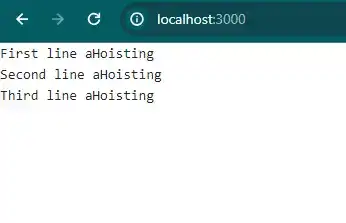
In the above code example, I have used the <p> tag and add new line in react without br.
Check the output of the above code example.
All the best 👍